
The WordPress setup behind this blog kept causing trouble: security issues, breaches, and a constant stream of updates for core, theme and plugins. For a site of articles that almost never change, that was too much upkeep and too much risk.
So I moved it to Hugo and now serve it as flat files from GitHub Pages, for free. This post covers why, how the SQL dump became Markdown, and the deployment setup.
The case against staying#
| WordPress | Hugo on GitHub Pages | |
|---|---|---|
| Server-side code | PHP, MySQL, core, theme, plugins | None |
| Login page | wp-login.php, attacked around the clock |
None |
| Serving a page | Queries and templates, hidden behind a cache plugin | A file from a CDN edge |
| Upkeep | Core, plugin and theme updates, backups, PHP and MySQL versions | Update one binary now and then |
Security#
WordPress runs a large share of the web, which makes it a permanent target. Bots do not care that this is a low-traffic blog about data engineering. They scan everything.
The core gets regular security patches, and missing one is enough. Plugins are the bigger problem: each is a separate codebase maintained by someone you have never met, capable of introducing SQL injection, XSS, remote code execution or an authentication bypass. Plugins with millions of installs have been exploited in the wild more than once. Themes carry the same risk, since they execute PHP on the server. On top of that, wp-login.php gets hammered around the clock by credential stuffing bots, and even when a lockout plugin blocks them they still generate load and bloat the logs.
A static site has no server-side code at all. No login page, no database, no PHP interpreter. The attack surface shrinks to the web server (GitHub’s problem now) and DNS. That is a very different sort of night’s sleep.
Speed#
WordPress builds every page on every request: connect to MySQL, query posts and meta and taxonomies and options, run the theme templates, assemble HTML, return it. Caching plugins hide most of that, but a cache is another moving part, and caches break in interesting ways, usually right after you change something.
With Hugo the HTML already exists before the request arrives. A CDN edge node hands over a file. There is no clever part to go wrong.
Maintenance#
The honest tally of what keeping a WordPress install healthy costs: core, plugin and theme updates; database backups plus the occasional cleanup when wp_options quietly grows autoloaded junk; watching for injected scripts and modified files; keeping PHP and MySQL versions current on the host. None of that produces a single sentence of writing.
The Hugo equivalent is updating a binary every few months and editing text files.
What Hugo is#
Hugo is an open source static site generator written in Go. It reads a directory of Markdown files, a theme made of HTML templates, and a config file, and writes out a finished website of HTML, CSS and JavaScript.
The things that matter in practice:
- Builds are fast. This site has 33 posts and roughly 85 migrated images, and a full build finishes in well under a second, which means the local preview updates as fast as I can alt-tab to the browser.
- The output has no runtime. Any HTTP server or CDN will do, and there is nothing to keep patched.
- Content is Markdown with YAML frontmatter, so posts are diffable, greppable and easy to script against.
- Templates use Go’s
html/template, with partials, taxonomies and shortcodes when you need them. - Categories and tags are first class, so listing pages appear on their own.
- Code blocks are highlighted at build time by Chroma, so there is no syntax highlighting JavaScript to ship.
A minimal site is about this big:
my-site/
  hugo.toml           # site config
  content/
    posts/
      my-first-post.md
  themes/
    minimal/
      layouts/
        _default/
          baseof.html
          single.html
          list.html
  static/
    images/
hugo server starts a live-reloading dev server. hugo writes the finished site into public/.
Converting the old content#
The WordPress export was a MySQL dump, so the converter was a Python script that read the dump directly rather than going through the XML exporter. Roughly what it did:
- Pull every row from
wp_postswherepost_status = 'publish'andpost_type = 'post'. - Turn the stored HTML into Markdown. Code blocks needed special handling, since the old SyntaxHighlighter plugin encoded the language in a
brush:class, and the code itself was HTML-escaped inside the post body. - Build the frontmatter from the post row plus its taxonomy relations: title, date, slug, categories, tags.
- Copy every image referenced under the WordPress uploads path into
static/images/uploads/and rewrite the URLs to local paths. - Rewrite links between posts from the old permalink format to Hugo’s
/posts/slug/.
Then the parts that were not in the plan.
Encoding. The dump was Windows-1252 pretending to be UTF-8 in places, a classic latin1 versus utf8mb4 mismatch from an old MySQL install. Apostrophes and dashes came through as mojibake. Reading with cp1252 and running a substitution table over the result fixed almost all of it, and I hand-checked the rest.
Shortcodes. Old WordPress shortcodes such as galleries have no meaning outside WordPress. There were only a handful, so I converted them by hand rather than teaching the script about them.
Attachments. Zip files, sample datasets and a few interactive HTML demos lived in wp-content/uploads/ and a separate media/ folder. Those were copied into static/ and kept their paths, which is the whole trick to not breaking old links.
Hosting on GitHub Pages#
GitHub Pages serves static sites straight from a repository, with HTTPS and a CDN, at no cost.
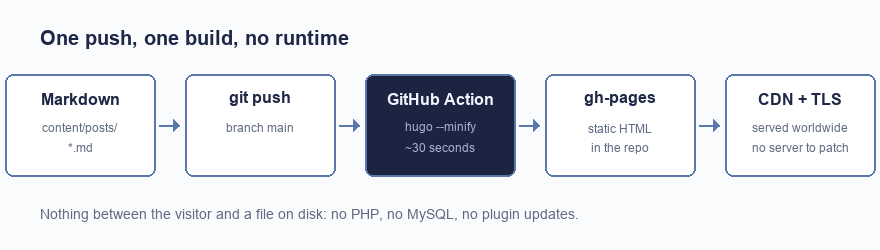 From git push to a live page: GitHub Actions builds the site and publishes it to the Pages CDN.
The repository holds the source: content, theme, config. A GitHub Actions workflow builds it on every push to main and publishes the result. The current workflow uses the official Pages actions rather than pushing to a gh-pages branch:
name: Deploy to GitHub Pages

on:
  push:
    branches: [main]
  workflow_dispatch:

permissions:
  contents: read
  pages: write
  id-token: write

concurrency:
  group: pages
  cancel-in-progress: false

jobs:
  build:
    runs-on: ubuntu-latest
    steps:
      - uses: actions/checkout@v4
        with:
          submodules: true
      - name: Setup Hugo
        uses: peaceiris/actions-hugo@v3
        with:
          hugo-version: latest
          extended: true
      - name: Build
        run: hugo --minify
      - name: Upload artifact
        uses: actions/upload-pages-artifact@v3
        with:
          path: ./public

  deploy:
    needs: build
    runs-on: ubuntu-latest
    environment:
      name: github-pages
      url: ${{ steps.deployment.outputs.page_url }}
    steps:
      - name: Deploy to GitHub Pages
        id: deployment
        uses: actions/deploy-pages@v4
Writing a post is now git commit, git push, and about half a minute of waiting.
Two things to know.
DNS#
Two record types point a custom domain at Pages: four A records for the apex domain, and a CNAME for www.
| Type | Name | Value |
|---|---|---|
| A | @ |
185.199.108.153 |
| A | @ |
185.199.109.153 |
| A | @ |
185.199.110.153 |
| A | @ |
185.199.111.153 |
| CNAME | www |
<username>.github.io |
Then set the custom domain in the repository’s Pages settings. GitHub requests a Let’s Encrypt certificate, which usually takes a few minutes, after which you can turn on Enforce HTTPS.
What I gave up#
It is a fair trade, but it is a trade.
| Feature | WordPress | Now |
|---|---|---|
| Comments | Built in | None, and an email address |
| Search | Database query | Client-side JSON index |
| Scheduled posts | Built in | A daily scheduled rebuild |
| Admin interface | wp-admin |
Markdown and git push |
Comments are gone. WordPress had them built in; a static site does not. The options are a third-party embed (which reintroduces exactly the tracking and JavaScript I was trying to shed), a self-hosted comment server (a running service again, so back to square one), or nothing. I went with nothing and an email address.
Search had to be replaced. There is no database to query, so the choices are a client-side index built at compile time or an external service. For a site this size a small JSON index is enough.
Scheduled publishing is not free either. Hugo will happily leave a future-dated post out of the build, but something has to trigger a rebuild on the day. A scheduled workflow run once a day handles it.
And there is no admin interface. Publishing means writing Markdown and pushing to git. For me that is the point. If you are handing the site to someone who does not use git, it is a real cost, and a headless CMS with a build hook is the sensible middle ground.
Would I do it again#
Yes, though I would be honest about who it suits. A brochure site, documentation, or a blog like this one is close to the ideal case. Anything with user accounts, e-commerce, or non-technical editors publishing daily is a different conversation.
What I notice most is not the speed, though pages do appear immediately. It is that the site has stopped generating work. There is no update queue, no patch cycle, nothing that requires my attention because someone in another timezone found a bug in a plugin. It just sits there being read, which is all I ever wanted from it.