Shorewall is a tool to configure Linux inbuilt IPTables in an easy and understandable way. Assume we have a basic setup: Lan | Firewall with Proxy server | Internet 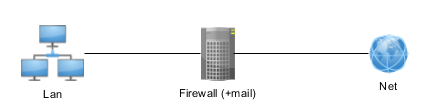 A secure setup is to:
- ACCEPT HTTP(80) and HTTPS(443) from LAN to NET
- ACCEPT special services ports from specific LAN to NET (like e-banking)
- ACCEPT only the needed FW services from LAN to FW - SSH(22) and MAIL(25,443,993,…) to FW (if mail server is on FW)
- ACCEPT only the needed FW services from NET to FW - SSH(22) with IP restriction (and SSH key) and MAIL(25,443,993,…) to FW (if mail server is on FW)
- SSH port can be changed
- LOC to LOC connections are not possible to be governed by FW, therefore all allowed
- REJECT any incoming connection (other than above) to LAN or FW
Shorewall configuration - with some additional examples on the syntax and rules:
# File: zones

# http://www.shorewall.net/manpages/shorewall-zones.html

#

###########################################################

#ZONE	TYPE		OPTIONS		IN			OUT

#					OPTIONS			OPTIONS

net	ipv4

loc	ipv4

fw	firewall


#-------------------------------------------------------

# File: masq

# http://www.shorewall.net/manpages/shorewall-masq.html

#

############################################################

#INTERFACE		SOURCE		ADDRESS		PROTO	PORT(S)	IPSEC	MARK

eth0    eth1


#------------------------------------------------------------------------------

# File: interfaces

# http://www.shorewall.net/manpages/shorewall-interfaces.html

#

############################################################

#ZONE	INTERFACE	BROADCAST	OPTIONS

net	eth0	detect

loc	eth1	detect   routeback


#------------------------------------------------------------------------------

# File: policy

# http://www.shorewall.net/manpages/shorewall-policy.html

#

############################################################

#SOURCE		DEST		POLICY		LOG		LIMIT:BURST

#						LEVEL

loc	net	REJECT

loc	fw	REJECT

fw	loc	ACCEPT

fw	net	ACCEPT

net	all	DROP	info

all	all	REJECT	info


#------------------------------------------------------------------------------

# File: rules

# http://www.shorewall.net/manpages/shorewall-rules.html

#

#############################################################

#ACTION		SOURCE		DEST		PROTO	DEST	SOURCE	ORIGINAL  RATE	USER/ MARK

#							PORT	PORT(S)

#DEST		LIMIT		GROUP

# Proxy server - exception on redirect for a server machine

REDIRECT        loc     3128    tcp     80    - !192.168.0.10

ACCEPT 		loc 	net	tcp	443


# Allow SMTP, SMTPs, HTTPs, POP3S for loc

ACCEPT     net	fw     tcp   25,443,995	-


AllowFTP   loc  net


# AllowAndroid  loc  net

ACCEPT     loc  net    tcp   5222,5228

ACCEPT     loc  net    udp   5222,5228


#AllowPOP, AllowIMAP loc net

ACCEPT     loc  net    tcp   110,143

ACCEPT     loc  net    udp   110,143


# Windows Update

ACCEPT     loc  net    udp   137,138,53

ACCEPT     loc  net    tcp   137,138,139,53

ACCEPT     loc  net    tcp   445


# loc:192.168.0.3 to have limitless connection to net

ACCEPT	loc:192.168.0.3	net	all
Assume we have a Hadoop cluster that needs secure firewall : 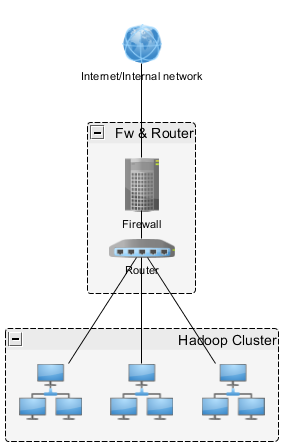 A secure setup is to:
- A FW functioning as a Jumpbox machine hiding all internal network components
- LAN as Cluster network
- All internal nodes without firewalls (if internal nodes can be accessed from the outside then the setup is elsewhat, all nodes with firewalls enabled with strict access policy)
- ACCEPT HTTP(80) and HTTPS(443) from LAN to NET for repository updates
- ACCEPT only the needed FW services from NET to FW - SSH(22) with IP restriction (and SSH key)
- SSH port can be changed
- REJECT any incoming connection to LAN or FW
- Access all Hadoop services, Ambari, Hue, etc. by using SSH tunneling to Jumpbox (FW)
The plan of the network topology and security for large Hadoop deployments with co-located racks needs thorough planning and security settings.